When you call Client.create() on Browser, Node, or React Native, or SDKClient.create() on Kotlin or Swift, these steps occur:
The client asks the signer for its identifier.
It looks up the inbox ID registered for that identifier on your backend. If none exists, it derives an inbox ID from the identifier and a nonce.
It opens or creates the local database for that inbox and installation.
It asks the signer to register a new installation when needed, unless registration.auto is false.
The signer’s identity is an Ethereum or passkey account. A handle cannot sign, so client creation fails with InvalidArgument for a handle. A registered client can claim a handle for its inbox with claimHandle.
For Node, React Native, Kotlin, and Swift, generate a secure 32-byte encryption key and store it so the app can use the same key on every launch. If the key changes or is lost, the client cannot read the former encrypted database. Keep the same key when reopening it.
The database key and path select the stored installation. A different path can select a new database. In Swift, the wrong key fails to open an existing encrypted database with a typed storage error. It does not replace the stored key. A new installation needs a signature and counts against the backend’s installation limit, which defaults to 10.
Store the key and path as durable app state. Keep the same storage location and label. An agent deployment must mount durable storage for XMTP_DB_DIRECTORY.
Database encryption key loss during iOS device transfers
A restored or transferred database cannot open if the app does not also restore its encryption key. Choose a backup policy for the database and key together. If your app excludes the key from backups, you can also exclude the database directory from backups.
For example, if you set StorageOptions.location to a known directory, you can mark it as excluded from backups in iOS:
For debugging, it can be useful to decrypt a locally stored database. When StorageOptions.encryptionKey is used, the XMTP client creates a SQLCipher database which applies transparent 256-bit AES encryption. A .sqlcipher_salt file is also generated alongside the database.
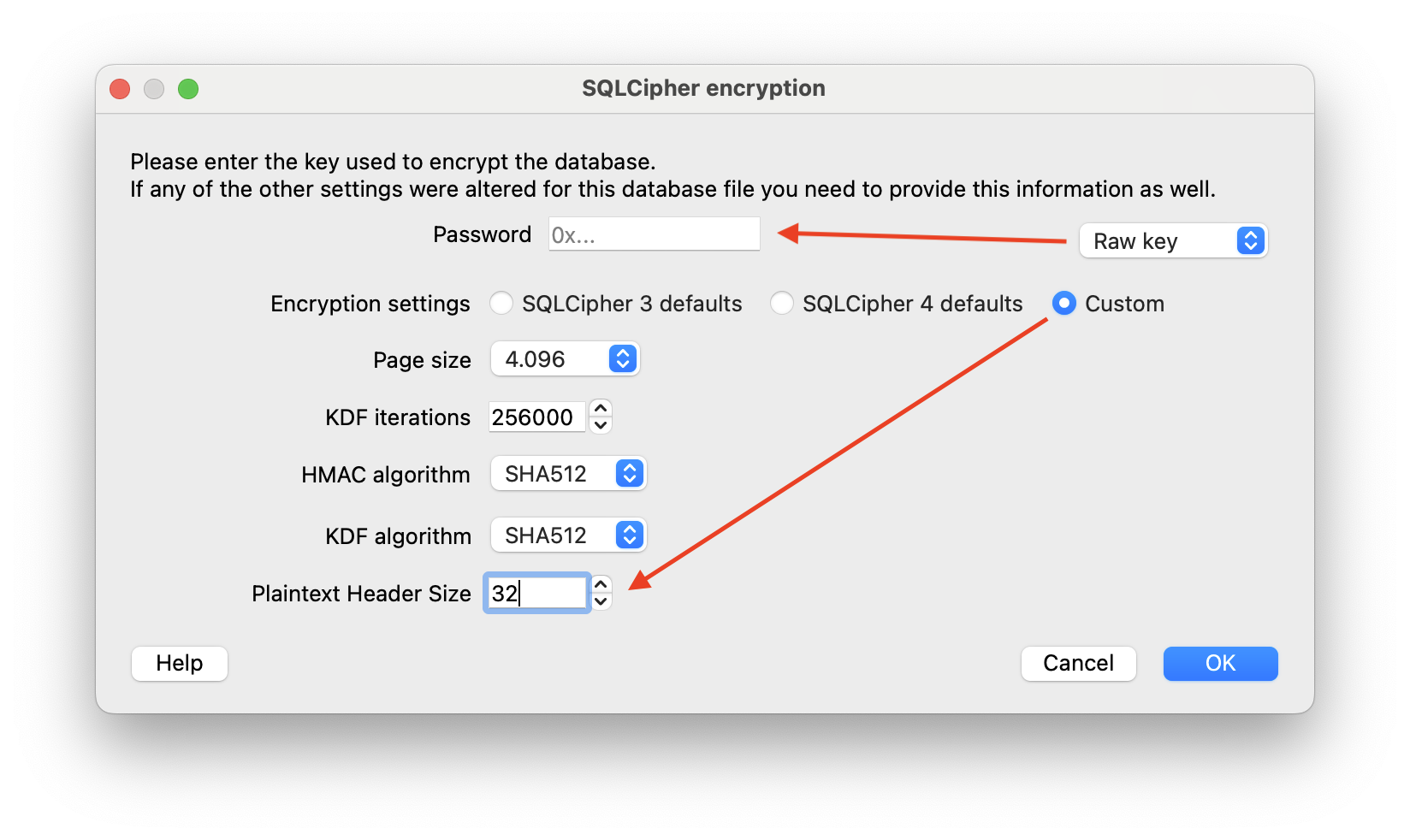
To open this database, you need to construct the password by prefixing 0x (to indicate hexadecimal numbers), then appending the encryption key (64 hex characters, 32 bytes) and the salt (32 hex characters, 16 bytes). For example, if your encryption key is A and your salt is B, the resulting password would be 0xAB.
If you want to inspect the database visually, you can use DB Browser for SQLite, an open source tool that supports SQLite and SQLCipher. In its Custom encryption settings, set the Plaintext Header Size to 32, and use the full Password as a Raw key:
PRAGMA key or salt has incorrect value means the supplied encryption key does not match the database. It can also mean that the file is not an XMTP database. Do not replace the stored key automatically. A replacement key cannot open the existing encrypted database.
database has data but no salt file means a keyed open found a nonempty database without its matching .sqlcipher_salt file. The open leaves the database unchanged. This is a non-retryable storage error (XmtpError.Storage / XmtpException.Storage, with details.code set to Storage). Resolve it based on how the database was created:
For a database created without encryption, omit storage.encryptionKey when reopening it.
If a copy or restore lost the salt file, restore the matching .sqlcipher_salt file from the same backup. Copy and back up that file with the encrypted database.
For an older encrypted database created without a salt file, keep a backup and create a new client at a new database path. The SDK does not convert that format.
Browser, Node, and React Native Client.create() take a signer, typed backend, and explicit
storage. Kotlin and Swift use ClientOptions.backend and
ClientOptions.storage. Use the platform example below.
For persistent Swift storage, pass a securely generated or caller-stored 32-byte
databaseKey: Data. Store it securely and reuse it when reopening the same
database. Omitting encryptionKey selects unencrypted storage. Pass the key for
all persistent locations: StorageOptions(location: .default, encryptionKey: databaseKey), StorageOptions(location: .directory(directory: directory), encryptionKey: databaseKey), or StorageOptions(location: .explicit(dbPath: dbPath, attachmentsDir: attachmentsDir), encryptionKey: databaseKey).
The SDKs share these client options. Browser, Node, and React Native use JavaScript records.
Kotlin and Swift use ClientOptions and StorageOptions records.
Option
Default
Purpose
backend
Supply explicitly
Connection options or a connected Backend
storage
Supply explicitly
Database location, label, and native encryption key
deviceSync
true
Enable device sync
allowOffline
false
Start from stored state without backend requests
registration.auto
true
Register the identity when needed
registration.nonce
0 when omitted
Nonce for deriving an inbox ID when no association exists
forkRecovery
Unset
Fork recovery policy and group selection
workers
SDK defaults
Background worker intervals
handlers.preAuthenticate
Unset
Callback before a registration signature request
attachments
SDK defaults
Attachment limits and private network access
Pass custom codecs in ClientOptions.codecs on Browser, Node, and React Native. Kotlin and Swift
take a codecs argument on SDKClient.create() and SDKClient.build().
Logging has a separate configuration API. See Debug.
JavaScript storage locations are "default", "inMemory", { directory }, or
{ dbPath, attachmentsDir }. Kotlin and Swift use the corresponding
StorageLocation variants. Browser storage uses OPFS and has no encryptionKey
option. Node, React Native, Kotlin, and Swift accept an optional 32-byte storage.encryptionKey.
Without that key, native storage is unencrypted.
A default or directory location stores each inbox under
{root}/{deployment}/{inboxId}/xmtp.db3. A non-empty storage.label adds one
directory below the root. An explicit location uses the supplied database and
attachments paths. Changing the location or label can select a new installation.
The default roots are xmtp-sdk in the Browser OPFS pool, xmtp in Node’s current
working directory, filesDir/xmtp_db on Android, and
Application Support/{bundleId}/xmtp on Apple platforms. The Android default needs
an application context. The Apple default needs a bundle identifier.
JavaScript backend accepts { url, appVersion?, credentials? } or a
connected Backend. JavaScript credentials accepts a CredentialSource or a
fixed Credential. Native BackendOptions has separate credentials and
credential fields. Create a reusable connection with Backend.connect(options).
Kotlin uses BackendSource.Options(options) or BackendSource.Connected(backend).
Swift uses .options(options: options) or .connected(backend: backend).
If the backend requires an API key or JWT, supply a CredentialSource in
BackendOptions.credentials. Its async credential() method returns value,
expiresAtSeconds, and an optional header name. Browser, Node, and React Native use a bigint
for expiry. Kotlin uses Long; Swift uses Int64. Expiry is in Unix seconds.
The default header name is authorization. For a bearer token, include Bearer
and one space before the token. This credential is separate from the XMTP signer
and the database encryption key.
The examples take an app function that obtains a token and its expiry. Fetch a
current token each time the callback runs. Do not log tokens or embed an
operator’s secret in a public app.
Pass the credential source in BackendOptions.credentials and pass those options
through ClientOptions.backend.
Agent apps pass backend.credentials to Agent.create or Agent.createFromEnv.
The SDK caches credentials and calls the source after expiry or rejection.
Callback failures report a fixed error without the app’s error text.
Server configuration discovery does not invoke the callback. Swift and Kotlin
connections use their configured credential source. See backend auth configuration.
Build, or resume, an existing client (created using Client.create()) that’s logged in and has an existing local database.
Build requires a database that already holds an identity. It does not register a
new installation and needs no signer. A missing database or an in-memory location
fails with IdentityNotFound.
Set ClientOptions.allowOffline explicitly for startup without backend requests.
Supplying an inboxId alone does not select offline mode on any SDK. Offline
startup needs that ID, or an explicit database path that holds it. A directory
location also needs a saved deployment record for the backend URL. The client
checks stored identity membership. A smart contract wallet check that needs a
network request can fail offline. Offline startup does not disable later network
operations.
Node, React Native, Kotlin, and Swift expose Storage.reconnect() through client.storage
(JavaScript) or client.storage() (Kotlin and Swift). Browser has no reconnect
method. There is no public method to drop a database connection temporarily.
Use client.end() when the app releases a client. End a client before replacing
or restoring its storage.
React Native installs native lifecycle observation before the first client. It
seeds the actual process state, including a background launch. Keep the same
native storage location and key when reopening. The app owns secret storage;
the SDK does not persist a signing key or select an OS backup policy for it.
See React Native and Expo for setup, React provider
ownership, and native rebuild requirements.